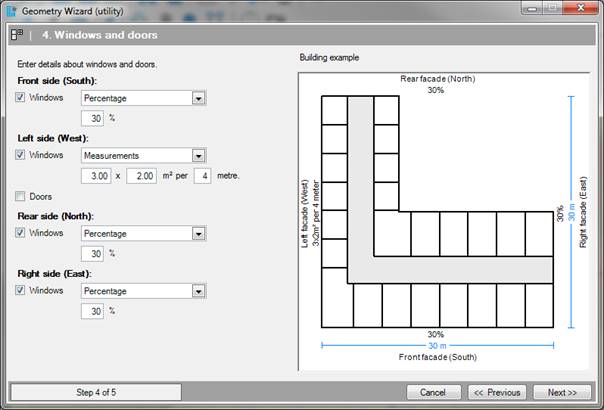
Front / Left / Rear / Right Side
The
windows and doors can be specified per side. The settings are applied to every
surface across the facade.
[Option, choice]
•Percentage [%] This input sets the percentage window area per wall surface.
•Dimensions [Square metres per metre] This input gives you the option to set the width and height of a window and the centre-to-centre distance of the individual windows.
•Dimensions [Square metres] This input sets the width and height of a door.
•You can exit the wizard at any time by clicking. Cancel. The Wizard will then be closed, and any data entered into it will be lost.
•You can change data in a previous step by clicking Previous.
•If the above information is entered correctly, go to Step 5 of 5; Assign templates to rooms by clicking on next.